Digital Audio Editor

Digital Audio Editor
License:
Trial version
Language:
English
Developer:
OS:
Win98/98SE/Me/2000/XP
Updated:
See detailed info

Softonic review

Bartley Sharkey

“A versatile program to edit your audio files”

by Bartley Sharkey about Digital Audio Editor

There seems to be no end to the stream of audio software being released for playing music and organising your collection but if you actually happen to be involved in the creative process you may notice a distinct lack of variety in the tools on offer. Sure Pro Tools does it all but not everyone is willing to fork out hundreds or even thousands of dollars for the required breakout box and other associated hardware. For those with a slight interest in audio editing and who would like to get a taste for what is involved, Digital Audio Editor proves to be a great platform, both thanks to the basic set of editing tools it offers and its pleasant, easy-to-use interface.

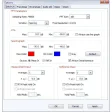
On getting started you can open any audio file you have saved or record a track from a CD or for example, your favourite internet radio station. Once you’ve chosen the sample rate and made a recording, you are given a visualisation of the wave form on both the left and right stereo channels. On a very basic level, you can simply select chunks of audio and manipulate them as you want; cutting, pasting, copying or mixing. Luckily, for those who like to experiment, you can set the level of undos available anywhere between one and one thousand meaning that even if you make a complete mess you can still get back to the original sample. However, if you do go into detailed editing beware that the trial version doesn't allow you to save files.

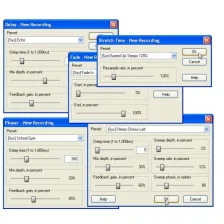
Of course, it features all the tools you'd expect to help you fade in and out, normalize samples, convert sample rates and add delay effects among others. However, when choosing an effect to add, there is no way to preview how it will sound which compares poorly to Sound Forge, another quality audio editor that lets you hear a short clip of the audio with the effect applied. In the case of Digital Audio Editor, this could well lead to a lot of time wasted waiting for effects to load and then going back again to adjust them to perfection.

All considered, Digital Audio Editor warrants its price tag of $40 (considering the professional solution will set you back $300), especially for users who have simple editing work to do such as cleaning up a podcast or correcting the sound levels of a mixed track. However if you are intent on doing some serious editing work then you would be better served by the pricier but more complete Sound Forge. As such, this makes a great option for beginners, hobbyists or anyone who's just curious.

Pros
  • Powerful
  • Good user interface
  • Simple
  • Large undo history
Cons
  • No save in trial
  • No preview for effects
  • Limited number of options
Download Digital Audio Editor 7.8.2.13

Digital Audio Editor is virus free

We have analyzed the latest version of Digital Audio Editor with 30 antivirus engines and it is virus free. See analysis results.

TESTED VIRUS FREE - Softonic GUARANTEED

Developer's description

Digital Audio Editor is a visual audio editor and recorder software solution, which supports many advanced and powerful operations with audio data.

With Digital Audio Editor you can:

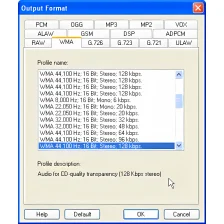
  • Open, create, and save audio files in any of the supported formats (can also save any portion of a loaded file to disk as a new file)
  • Display audio data waveform (Zoom Full, Zoom In, Zoom Out, Zoom Vertical)
  • Play audio files or any portion of the files (Play, Pause, Stop)
  • Record audio data from a microphone or any other available input device (you can record audio from DVD / VCD / CD Player, MP3 Player, RealPlayer, Windows Media Player, Web Page, Internet Conversation, Internet News, Internet Radio Station and much more)
  • Edit audio files visually (Cut, Copy, Delete Selection, Delete Silence, Paste, Paste From File, Mix, Mix From File)
  • Apply various effects (Amplify, Compressor, Delay, Equalize, Fade In and Fade Out, Flanger, Invert, Normalize, Phaser, Reverb, Reverse, Silence, Shrink, Stretch, etc.)
  • Apply different filters to any selected portion of audio files
  • Convert an audio file from one format to another, and much more

Review and rate Digital Audio Editor

Your avatar

Your opinion is important.
Help other users - be the first to review this program.

Review
  1. Maximum: 75 characters

  2. See example

Pros and Cons
Rate
  1. What rating would you give Digital Audio Editor?

    You need to fill in all fields

    • Usability:

      Not rated
    • Stability:

      Not rated
    • Installation:

      Not rated
    • Functionality:

      Not rated
    • Appearance:

      Not rated
    • Overall rating:

      Not rated
  2. Don't worry, we won't make your email address public.

You're not allowed to share serial numbers, cracks, etc. or link to pages that contain them. If you do, your user account will be deleted, your IP address logged and legal action will be taken.

Get started - just ask a question!

Write a title for your question.

Alternativesto Digital Audio Editor

  • In English:
    Audacity
    Audacity

    Comprehensive audio recorder and editing suite

    Softonic rating:
    • 9/10
    User rating:
    • 8/10
  • Free:
    Audacity Portable
    Audacity Portable

    Take the best free sound editor wherever you go.

    Softonic rating:
    • 9/10
    User rating:
    • 6/10
Compare with Digital Audio Editor

Screenshots from Digital Audio Editor

Download rank: Multiformat

9 of 33

Softonic rating:
  • Very good
  • 8/10
User rating: (3 ratings)
  • Not bad
  • 6/10
Your rating:
Your rating
  • 0

Review and rate this program

Blog posts about Digital Audio Editor

Top Downloads: Multiformat

  • United States
  • Global

  1. WavePad

    Excellent free sound editor

  2. Audacity
  3. Sound Forge Audio Studio
  4. Ableton Live
  5. ACID XPress

Reviews of Digital Audio Editor in other languages